

How Convert Date Format to YYYY-MM-DD with PHP
$date = "07/12/2010";
$your_date = date("Y-m-d", strtotime($date));$date = "07/12/2010";
$your_date = date("Y-m-d", strtotime($date));<?php
if (strpos($_SERVER['HTTP_USER_AGENT'], '(compatible; MSIE ')!==FALSE) {
//action for internet explorer
header('location:form-ie.php?idu='.$_GET['idu']);
} else {
//action for other browser
header('location:form.php?idu='.$_GET['idu']);
}
window.onunload=function(){SomeJavaScriptCode};
$(window).unload(function() {
//some javascript code
}
$yesterday = date("Y-m-d",strtotime("-1 day"));echo $yesterday;
ALTER TABLE `table-name` CHANGE `table-name`. `field_name` TEXT CHARACTER SET utf8 COLLATE utf8_general_ci NOT NULL
echo $testing;print_r(error_get_last());?>Output :
Array([type] => 8[message] => Undefined variable: testing[file] => C:\webfolder\test.php[line] => 2)
| Parameter | Description |
|---|---|
| error | Required. The error message to log |
| type | Optional. Specifies the error log type. Possible log types:
|
| destination | Optional. Specifies where to send the error message. The value of this parameter depends on the value of the "type" parameter |
| headers | Optional. Only used if the "type" parameter is "1". Specifies additional headers, like From, Cc, and Bcc. The additional headers should be separated with a CRLF (\r\n).Note: When sending an email, it must contain a From header. This can be set with this parameter or in the php.ini file. |
$test=2;
if ($test>1){error_log("A custom error has been triggered",1,"someone@example.com","From: webmaster@example.com");}?>
A custom error has been triggered
| Value | Constant | Description |
|---|---|---|
| 1 | E_ERROR | Fatal run-time errors. Errors that can not be recovered from. Execution of the script is halted |
| 2 | E_WARNING | Non-fatal run-time errors. Execution of the script is not halted |
| 4 | E_PARSE | Compile-time parse errors. Parse errors should only be generated by the parser |
| 8 | E_NOTICE | Run-time notices. The script found something that might be an error, but could also happen when running a script normally |
| 16 | E_CORE_ERROR | Fatal errors at PHP startup. This is like an E_ERROR in the PHP core |
| 32 | E_CORE_WARNING | Non-fatal errors at PHP startup. This is like an E_WARNING in the PHP core |
| 64 | E_COMPILE_ERROR | Fatal compile-time errors. This is like an E_ERROR generated by the Zend Scripting Engine |
| 128 | E_COMPILE_WARNING | Non-fatal compile-time errors. This is like an E_WARNING generated by the Zend Scripting Engine |
| 256 | E_USER_ERROR | Fatal user-generated error. This is like an E_ERROR set by the programmer using the PHP function trigger_error() |
| 512 | E_USER_WARNING | Non-fatal user-generated warning. This is like an E_WARNING set by the programmer using the PHP function trigger_error() |
| 1024 | E_USER_NOTICE | User-generated notice. This is like an E_NOTICE set by the programmer using the PHP function trigger_error() |
| 2048 | E_STRICT | Run-time notices. PHP suggest changes to your code to help interoperability and compatibility of the code |
| 4096 | E_RECOVERABLE_ERROR | Catchable fatal error. This is like an E_ERROR but can be caught by a user defined handle (see also set_error_handler()) |
| 8191 | E_ALL | All errors and warnings, except level E_STRICT (E_STRICT will be part of E_ALL as of PHP 6.0) |
//Disable error reportingerror_reporting(0);
//Report runtime errorserror_reporting(E_ERROR | E_WARNING | E_PARSE);
//Report all errorserror_reporting(E_ALL);?>
//custom error handler functionfunction customError($errno, $errstr, $errfile, $errline) { echo "Custom error: [$errno] $errstr
"; echo " Error on line $errline in $errfile
"; }
//set user-defined error handlerset_error_handler("customError");
$test=2;
//trigger errorif ($test>1) { trigger_error("A custom error has been triggered"); }
//restore built-in error handlerrestore_error_handler();
//trigger error againif ($test>1) { trigger_error("A custom error has been triggered"); }?>
Custom error: [1024] A custom error has been triggeredError on line 14 in C:\webfolder\test.php
Notice: A custom error has been triggered in C:\webfolder\test.php on line 21
User Agent SwitcherThe User Agent Switcher extension adds a menu and a toolbar button to switch the user agent of a browser.install addon user agent switcher for firefox hereDownload xml device list here
UAControllerUser agent switcher addon changes the user agent globally (for every site). If you want to just change the user agent on a site-by-site basis, install the UA Control addoninstall addon user agent switcher for firefox here
C:\Users\AppData\Roaming\IDM\DwnlData


<?php
function createRandomPassword($long=4) {
$charsL = "abcdefghijklmnopqrstuvwxyz";
$charsU = "ABCDEFGHIJKLMNOPQRSTUVWXYZ";
$int = "0123456789";
srand((double)microtime()*1000000);
$i = 1;
$pass = '' ;
$randStart = rand(1,3);
while ($i <= $long) {
if ($randStart == 1){
$num = rand() % 26;
$tmp = substr($charsL, $num, 1);
}
if ($randStart == 2){
$num = rand() % 26;
$tmp = substr($charsU, $num, 1);
}
if ($randStart == 3){
$num = rand() % 10;
$tmp = substr($int, $num, 1);
}
$pass = $pass . $tmp;
if ($randStart <= 2 )
$randStart = $randStart +1;
else
$randStart = $randStart -2;
$i++;
}
return $pass;
}
echo createRandomPassword(); //
copy folder activemq ke /opt/chmod 777 folder activemq
sudo /opt/activemq/bin/activemq start
akses http://localhost:8161/admin/ pada browser
# /etc/init.d/apache2 start$ sudo /etc/init.d/apache2 start# /etc/init.d/apache2 restart$ sudo /etc/init.d/apache2 restart# /etc/init.d/apache2 stop$ sudo /etc/init.d/apache2 stop
1 Win + E - Menunjukkan semua ruang kerja dengan cara yang bagus dan memungkinkan Anda beralih di antara ruang kerja dengan mudah.
2 Alt + Ctrl + Kiri / kanan Arrow - Pindah ke Workspace di Kiri / Kanan
3 Alt + Ctrl + Shift + Kiri / kanan Arrow - Pindah jendela aktif ke workspace lain
4 Alt + Shift + Up Arrow -. Ini memulai mencari antarmuka jendela keren switcher dengan mana Anda dapat beralih di antara jendela dengan menggunakan tombol panah sambil memegang Alt + Shift

5 Alt + F9/F10 -. Minimalkan / Maksimalkan jendela aktif
6 Alt + F5 -. UnMaximizes Jendela Lancar
7 Alt + F7 -. Shortcut ini akan mengaktifkan opsi memindahkan jendela yang memungkinkan Anda memindahkan jendela saat ini menggunakan tombol panah. Anda bahkan dapat memindahkan jendela ke ruang kerja lainnya, coba pindah ke kanan ekstrim.
. 8 Alt + F8 - Mengubah ukuran jendela saat ini dengan tombol panah
9 Ctrl + Alt + D - Show Desktop / Restore jendela terbuka jika desktop yang digunakan menunjukkan sebelumnya
10 Alt + Shift + Tab - Berpindah Windows di Balik Arah seperti yang dilakukan menggunakan Alt + Tab
11. Shift + Ctrl + N - Create New Folder, shortcut Sangat berguna
12 Alt + Enter -. Tampilkan properti dari file yang dipilih / folder tanpa memerlukan untuk klik kanan padanya dan pilih Properties.
13 Ctrl + 1 / 2 - Ubah folder tujuan untuk ikon / daftar..
14. Ctrl + W - dekat saat Nautilus Jendela
15 Ctrl + Shift + W -. Tutup semua terbuka Nautilus Windows
16. Ctrl + T - Buka tab baru di Nautilus
17 Alt + Up / Down Arrow - Pindah ke Folder Parent / folder Terpilih
18 Alt + Kiri / Kanan Arrow - Pindah Kembali / maju di Nautilus
19 Alt + Home - Pindah langsung ke Home Folder Anda
20 F9 - menampilkan Beralih dari Nautilus Sidepane.
21 Ctrl + H - Layar Beralih dari file dan folder tersembunyi
22 Ctrl + Alt + L - Cepat pintas untuk Mengunci Layar jika Anda perlu untuk berada jauh dari desktop Anda untuk beberapa saat dan tidak ingin orang lain untuk melihat desktop Anda.
24 Alt + F2 - Buka Kotak dialog Jalankan Aplikasi
23 Alt + F1 - Buka menu Aplikasi
25 Win + roda mouse - Perbesar / Perkecil Desktop.. Yang satu ini cukup berguna jika Anda memiliki keyboard nirkabel / mouse.
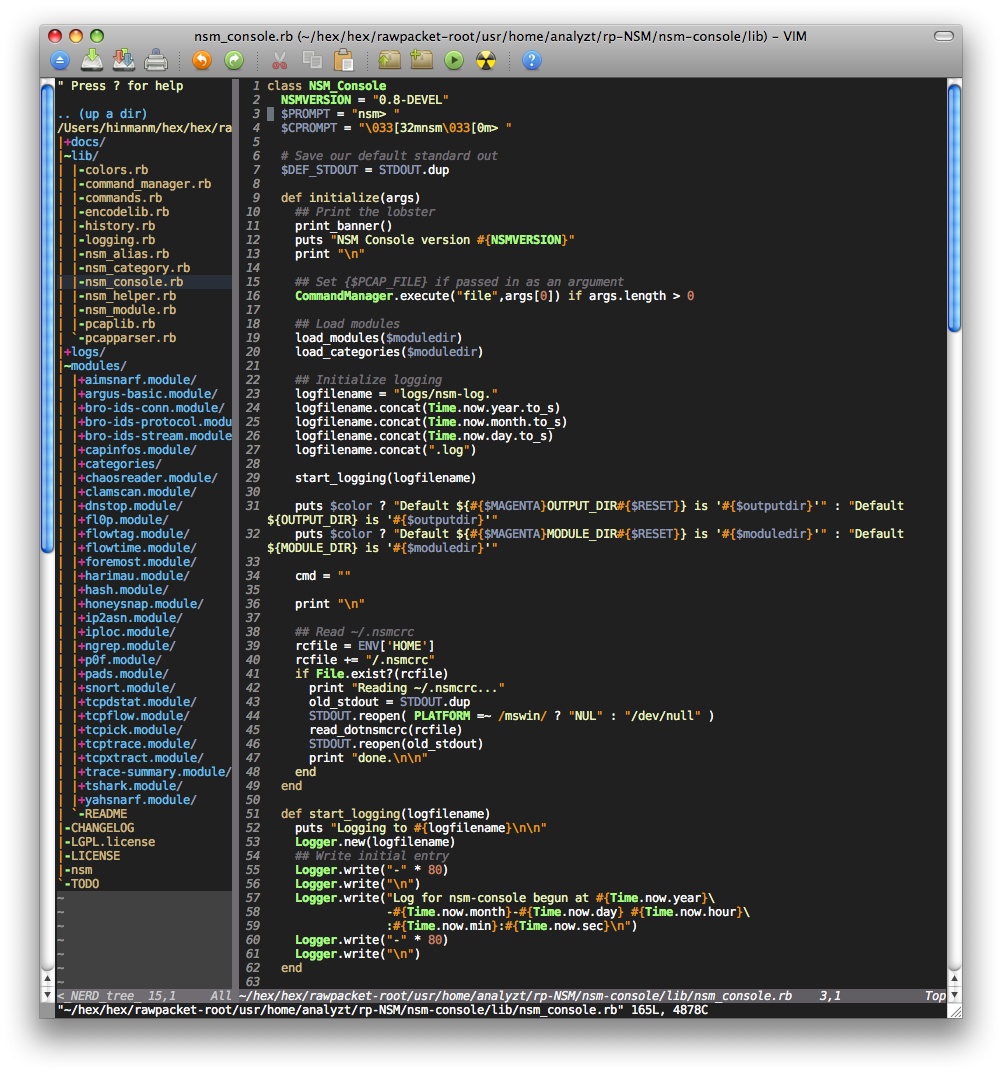 Namun dari kekurangan fungsi gvim, saya masih tetap menggunakan netbeans, tapi yang saya inginkan memiliki tampilan skema warna yang sama seperti gvim untuk netbeans saya... dan akhirnya saya temukan..
 berikut link download untuk skema warna untuk netbeans yang bernama desert